
Clicks don't show up
Symptom: the Dashboard's "Pageviews" card shows the visits, but the "Clicks" card stays at zero or well below what you expected.
A click is counted when the lead goes through the funnel's join link. So the problem is almost always the page button.
What to check
The button uses the funnel's join link. In Funnels, click "View Tutorial" and copy the link from the "Use this link for people to join your Group" step (it starts with
https://t4y.io/v2/). That's the link that goes on the page button.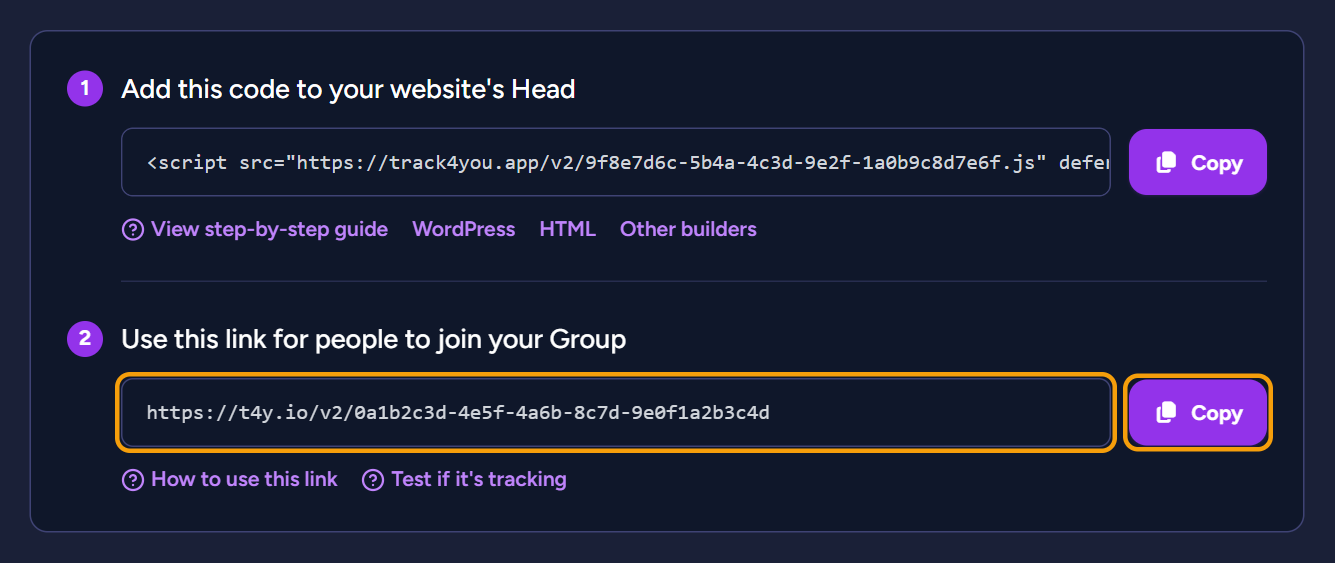
The button is a regular link. Set up the button with the direct link in the builder's link (URL) field. Avoid link shorteners (like bit.ly) and buttons that open the link through code or a pop-up.
The link belongs to the right funnel. Each funnel has its own link. If you deleted a funnel and created another one, replace the link on your pages with the new funnel's link.
The ad takes people to the page, not straight to Telegram. The tracked path is ad → page → button → channel.
The subscription is active. With a canceled subscription, tracking is paused. If the app shows the overdue payment notice, settle the payment. See Overdue payment or canceled subscription.
How to test again
Open the page in an incognito tab, click the button and check the Dashboard's "Clicks" card after a few minutes. See Test whether the funnel is tracking.
Still not showing up?
Contact support and send the page address and the funnel name.