
Set up the page button
Your page button is the bridge between the page and the channel. With the funnel's join link on it, every click and every channel join is tied to the campaign it came from, with advanced tracking and 99.9% accuracy.
Before you start
- A funnel created. See Create a funnel.
- The script installed in the header of the funnel pages. See Install the script on your page.
Step by step
In the menu, open Funnels and click "View Tutorial" (book icon) on the funnel row.
Under "Use this link for people to join your Group", click "Copy".
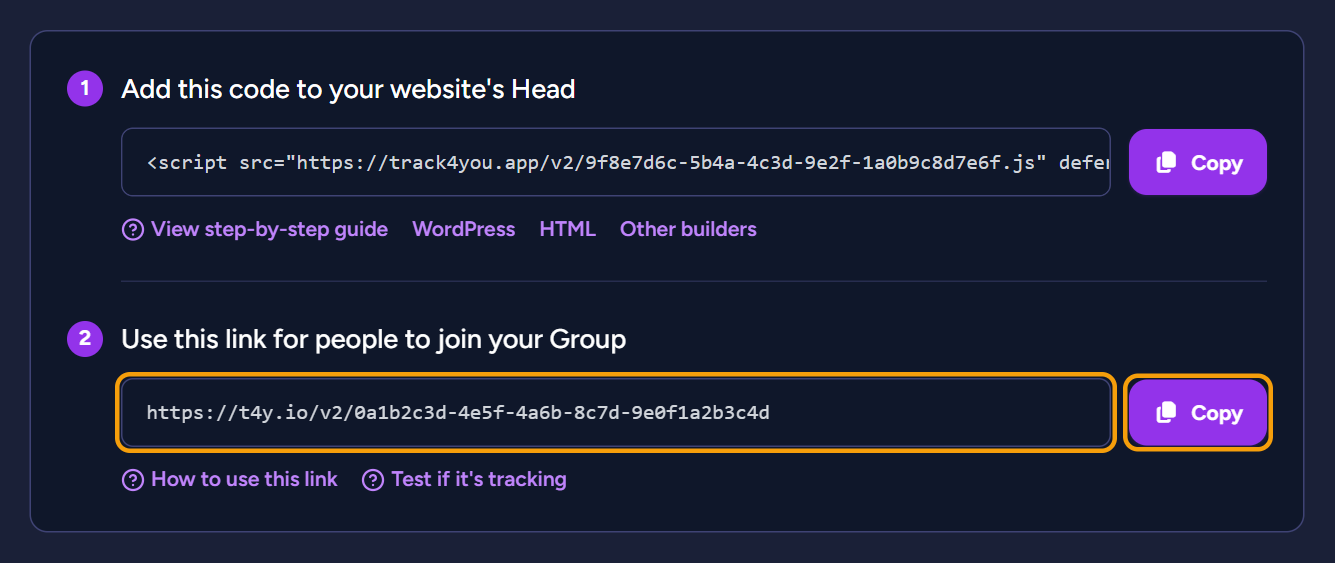
In your page editor, paste the link on the button that leads to the group (in the button's link or URL field). The link looks like this:
texthttps://t4y.io/v2/0a1b2c3d-4e5f-4a6b-8c7d-9e0f1a2b3c4dIf the page has more than one button to the group (at the top, in the middle and at the end, for example), use the same link on all of them. Publish the page.
See where the link field is in your builder: WordPress (Elementor), HTML page or other builders.
Best practices
- One link per funnel. Each funnel has its own join link. On a funnel's pages, use only that funnel's link.
- The ad leads to the page. The ad points to your landing page, and the page button leads to the channel through the join link. That's the path Track4you follows from start to finish.
- Use UTMs in your ads. The parameters you add to the ad link (like
utm_source,utm_mediumandutm_campaign) show up in Metrics, lead by lead. - Telegram only for the group. On the funnel pages, use Telegram links only on the button to join the channel. For support or contact, use WhatsApp, email or a page outside the funnel.
Always use the funnel link
Don't use the Telegram invite link (t.me/+...) or the channel's @ on the button. The funnel's join link is what makes sure every join is tracked and delivered to your pixel.
How to check it worked
- Open the published page, click the button and check that it opens your channel in Telegram.
- Do the funnel test: the click shows up in the Dashboard, on the "Clicks" card.
Common problems
- The click doesn't show up in the app: check that the button has the current funnel's join link (and not one from a funnel you deleted). See Clicks don't show up.
- The channel join doesn't show up: check that the person joined by clicking the page button. See Channel joins don't show up.