
Change your plan
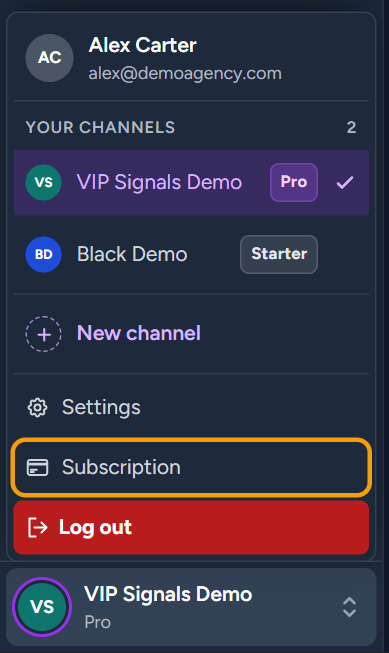
Need more domains, pixels or funnels, the TikTok pixel or Integrations? You change plans on the Plans page, which opens from the "Subscription" item in your profile menu, and the change takes effect as soon as you confirm.
Before you start
- The subscription needs to be active or overdue. If it was canceled, see Overdue payment or canceled subscription.
- Check what each plan includes in Plans and limits. Prices at track4you.app.
Step by step
At the bottom of the sidebar menu, click the channel card to open the profile menu, then click "Subscription".
On the Plans page, click "Upgrade" or "Downgrade" on the card of the plan you want.
Check in the notice what the channel will have and how billing works:
- Upgrade: the difference for the days left this month is charged right away, to the subscription's card.
- Downgrade: the value of the days left on the current plan becomes credit on your next invoices.
Click "Switch to Pro" (or the plan you chose).
How to check it worked
- The bottom of the sidebar menu shows the new plan's name.
- The Domains, Pixels and Funnels counters start showing the new plan's limit (e.g. "3/8").
- If you moved to Pro or Enterprise, the Integrations menu and the "TikTok" card in "New Pixel" unlock. See Add the TikTok pixel to Track4you.
Moving to a smaller plan
Your items stay there, but you can only create new ones once you're below the new plan's limit. On Starter, the Integrations menu is locked.
What happens to the TikTok pixel on Starter
If the channel has a TikTok pixel, the confirmation notice shows "Your TikTok pixel will pause", with the pixel's name and how many funnels it's in.
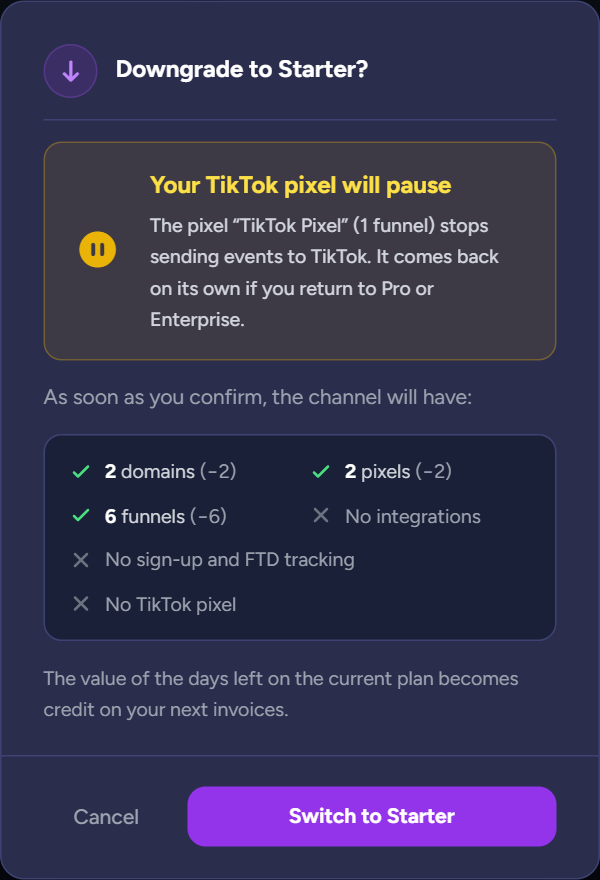
When you confirm the change:
- sending events to TikTok pauses: nothing goes to TikTok while the plan doesn't include it;
- the pixel and the funnels stay there, and the funnels keep counting visits, clicks and joins in the app;
- the pixel shows the "Paused" badge in Pixels. See TikTok pixel status and errors.
When you go back to Pro or Enterprise, sending resumes on its own, with nothing new to set up.
Common problems
- "Subscription" doesn't show up in the profile menu: the account doesn't have an active subscription. Use the "Plans" item in the sidebar menu to subscribe again. See Overdue payment or canceled subscription.
- The plan didn't change at the bottom of the menu: reload the page. If it stays the same, contact support.