
Edit or delete an integration
Each row in "Your Integrations" has four actions:
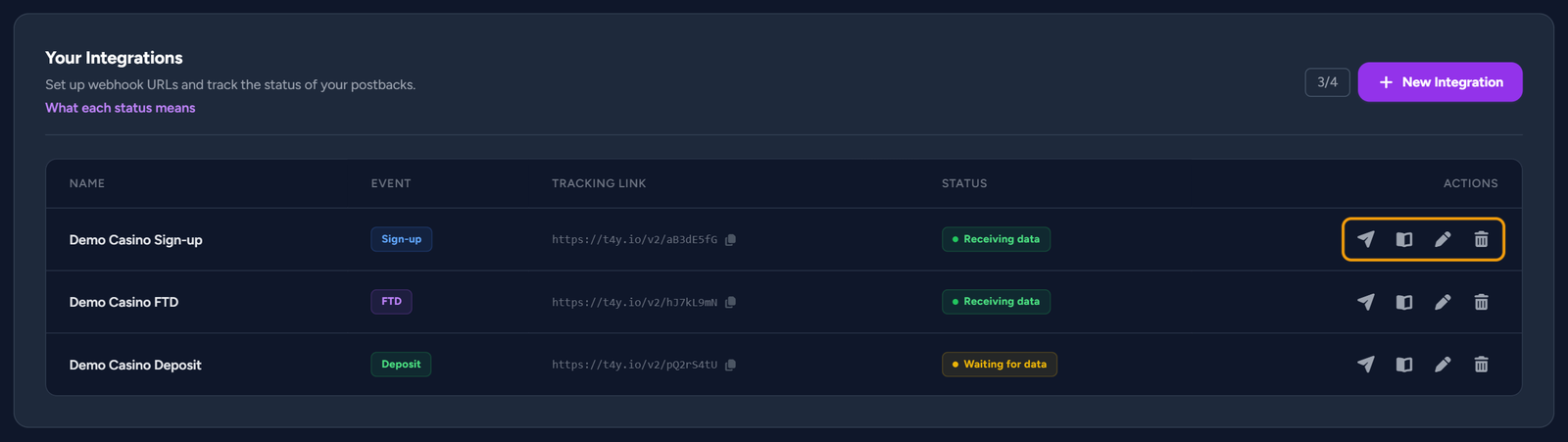
| Icon | Action | What it's for |
|---|---|---|
| Paper plane | Test Event | Sends a test event to the pixel. See Integration Test Event. |
| Book | View Tutorial | Shows the tracking link and the postback URL again, so you can copy them. |
| Pencil | Edit Integration | Changes the name, pixel, "URL Identifier" and destination. |
| Trash can | Delete | Removes the integration. |
You can also copy the tracking link straight from the "Tracking Link" column.
Edit
You can change the "Name", the "Pixel", the "URL Identifier" and the "Redirect Link (Destination)". The "Event Type" (and the custom event name) is locked: for another event, create a new integration.
Changed the "URL Identifier"? Update the platform
The identifier changes the parameter the click ID reaches the platform in, and the macro in the postback URL. After saving, open "View Tutorial", copy the new postback URL and update it on the platform. Check with the platform which macro matches the new parameter. See the Technical guide.
The tracking link doesn't change when you edit: the ads and content that already use the link keep working, now taking people to the new destination.
Delete
When you delete it, the integration leaves the list and frees up a slot in your plan's limit. Before deleting:
- take the tracking link out of your ads and content;
- remove the postback URL from the platform.