
Join Request in the funnel
With Join Request turned on, the lead requests to join the channel instead of joining directly, and the request is approved by the channel. This is the option that unlocks automated messages: a welcome message in private chat and automatic approval of requests.
What changes with the option on
| Without Join Request | With Join Request | |
|---|---|---|
| How the lead joins | Joins the channel directly, when opening the link | Requests to join and the request is approved |
| Welcome message in private chat | No | Yes, when requesting to join |
| Automatic approval (Auto-Approval) | Doesn't apply | Yes, right away or after a delay you choose |
| Messages menu | Stays locked | Is unlocked |
The request can be approved in two ways:
- Automatically, with Auto-Approval turned on in Messages. You choose whether it approves right away or after a delay. See Automatic approval (Auto-Approval).
- Manually, by you or another administrator, in the channel's join request list on Telegram.
Before you start
- A private channel. Join Request doesn't work in public channels. See Public or private channel?.
Step by step
In the menu, open Funnels and click "New" (or the Edit pencil on an existing funnel).
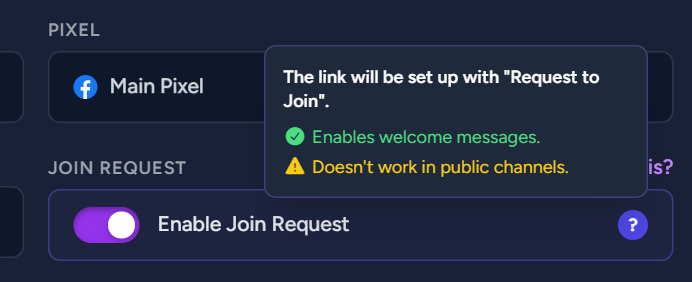
Under "Join Request", turn on "Enable Join Request". Hover over the "?" to see the summary: the link will be set up with "Request to Join", the option enables welcome messages and it doesn't work in public channels.
Finish setting up the funnel and save. See Create a funnel.
Open Messages and set up what the lead receives: the message bot, the welcome message and Auto-Approval. See Automated messages: what you can do.
You can turn it on or off later
You can change Join Request at any time in Edit on the funnel. The join link stays the same, so you don't need to change anything on the page.
Turn on Auto-Approval
Without Auto-Approval, each request waits for you to approve it on Telegram. To keep the lead from waiting at the channel's door, turn on Auto-Approval in Messages.
How to check it worked
- The Messages menu is unlocked.
- Open the funnel's join link with a Telegram account that isn't in the channel: Telegram shows the option to request to join.
- With the welcome message set up, it arrives in private chat as soon as the request is made.
Common problems
- "Enable Join Request" is disabled: your channel is public. To use the option, make the channel private on Telegram. See Public or private channel?.
- The Messages menu is still locked: check that the funnel was saved with "Enable Join Request" turned on.
- The welcome message doesn't arrive: see Automated messages don't reach the lead.