
Subscription, invoices and cancellation
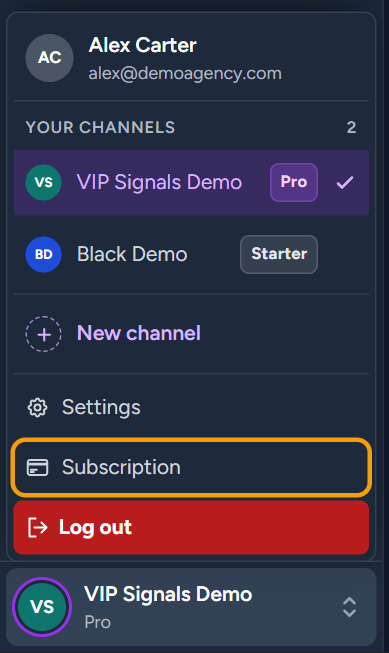
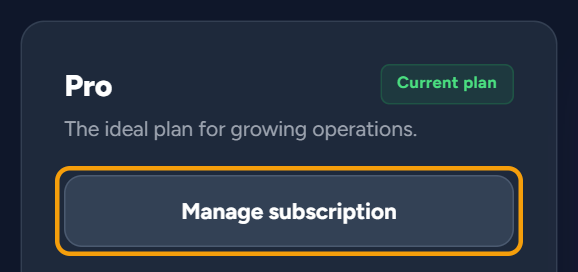
The "Subscription" item in the profile menu opens the Plans page. There, the "Manage subscription" button takes you to the subscription portal, where you'll find the payment method, the invoice history and cancellation.
Before you start
- The "Subscription" option shows up in the profile menu when the subscription is active or overdue.
- Each channel has its own subscription and invoice, and the portal opens the one for the channel that's open. If you have more than one, switch to the right channel first. See Track more than one channel.
Open the portal
At the bottom of the sidebar menu, click the channel card to open the profile menu.
Click "Subscription". The Plans page opens.
On the card with the "Current plan" badge, click "Manage subscription".
The subscription portal opens: a secure payment page. When you're done, leave the portal and you'll go back to the Dashboard.
With an overdue subscription, the "Subscription" item takes you straight to the portal, without going through the Plans page.
What you can do in the portal
- See the active plan, with the next payment.
- Update the payment method, e.g. replace an expired card.
- See and download the invoices already paid, in the history.
- Cancel the plan.
To change plans, use the buttons on the Plans page itself. See Change your plan.
Cancel the subscription
- Open the portal with the "Manage subscription" button, as above.
- In your active plan's area, choose the option to cancel the plan and confirm.
Cancellation only applies to the channel that's open: the other channels under your login keep their plans.
After you cancel, your access continues until the end of the period you've already paid for. When that period ends, tracking and automated messages are paused and the app shows the "Your subscription was canceled" notice, with the date until which you can subscribe again without losing your data. See Overdue payment or canceled subscription.
Before canceling
If the reason is the size of the plan, you can move to a smaller plan instead of canceling, and keep tracking running. See Change your plan.
Common problems
- "Subscription" doesn't show up in the profile menu: the subscription was canceled. Use the "Plans" item in the sidebar menu to subscribe again.
- Payment declined: update the payment method in the portal to keep your features from being suspended. See Overdue payment or canceled subscription.
- Question about a charge: contact support.